Why We Built Warehouse Heatmap


There are two businesses I run that ship physical product through third-party warehouses. Not at scale — between them they move a few thousand orders a month. Small enough that I'm still close to the operations, big enough that the warehouse choices matter.
After years of QBRs, monthly reviews, and "can you pull a report on..." requests, I noticed something strange. Every 3PL I worked with had the same pattern:
A WMS that captured every pick, every putaway, every move. And nobody — not the operators, not the managers, not me — looking at the data in any form except a spreadsheet.
The data was always there. The picture was never there.
The Camelot conversation
Chuck Feldman and I have known each other for years through the Warehouse Bridge orbit. He spent two decades inside 3PLs as a CIO and as VP of Logistics Application Systems at Port Logistics (which got bought by Ryder). When he started looking at our customers' Camelot WMS data, the conversation kept landing in the same place:
"They've got everything. Every bin, every pick, every velocity number. They run their slotting decisions on memory."
That was the gap we kept circling. Not a missing data set. A missing picture.
Camelot WMS does the operational job beautifully — receive, putaway, pick, ship. What it doesn't naturally do is sit a director in front of a 3D model of their facility and say here's what your warehouse actually looks like in motion. The information is in the database. Reaching it requires the right query, the right column choices, and an Excel pivot.
We wanted the picture by default.
What we kept hearing from ops directors
When we started showing early heat-map prototypes to people on Camelot, three reactions kept repeating:
"I knew that aisle was dead but I couldn't prove it."
Every operator has a hunch about which sections of the warehouse aren't pulling weight. Without a visual, the hunch never translates into a decision — let alone a pitch to the boss for a layout change.
"Wait — those bins haven't been touched in how long?"
Stagnant SKUs hide easily in spreadsheet form. They jump out of a heat map. The first time someone sees a sea of cold-coloured bins they thought were active inventory, the conversation about slotting changes immediately.
"I want to show this to my client / my CFO / my warehouse manager."
A heat map is a stakeholder document. A spreadsheet isn't. The visual is what gets a 3PL the renewal, gets a CFO to sign off on the layout change, gets a warehouse manager to actually run the re-slot.
The opinionated bit
Warehouse Heatmap is built around one editorial choice: visualization first, drill-down second. Every other warehouse analytics product I've used starts with a table and offers visualizations as garnishes. We started with the picture because that's what operators actually act on.
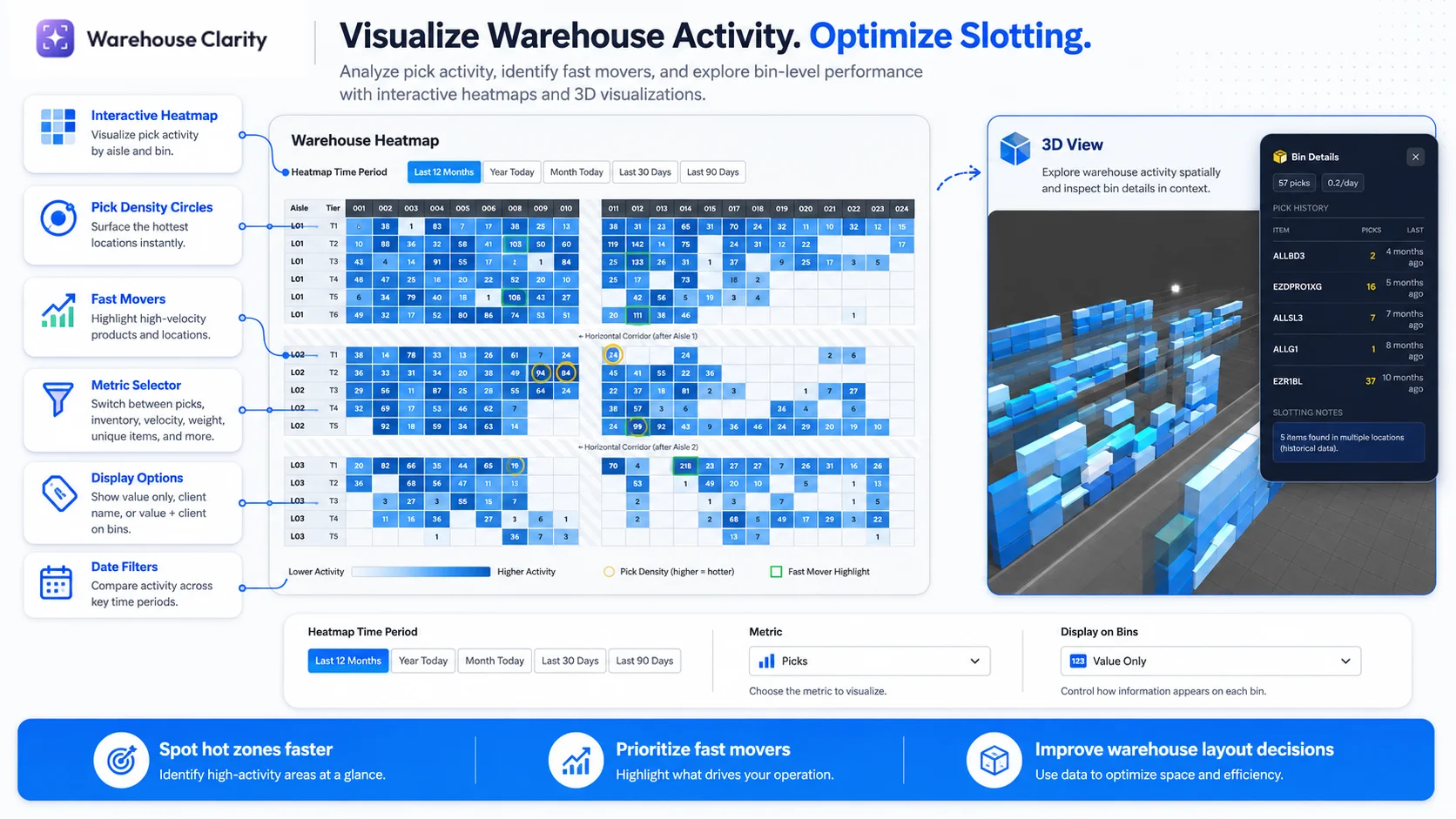
The 2D grid view, the 3D facility model, the bin-level drill-down — they're all variants of the same idea. Show the warehouse. Then let people zoom in.
What it cost us to make this opinionated
A few things we deliberately said no to, and probably will keep saying no to:
- Per-user pricing. A heat map that only one person can look at isn't a heat map; it's a screenshot. Every plan includes unlimited users.
- Middleware-heavy integration. Direct connection is the gold standard, and we'd rather not ship one that needs a custom dev project to switch on. Camelot is live now. On a different WMS? You don't have to wait — upload your data today, and join the integration waitlist while we build yours next.
- Another spreadsheet exporter. You already have one. The whole point is to give you something the spreadsheet can't.
What's next
The product we have today is the smallest version of Warehouse Heatmap that earns its keep — connect to Camelot, see the heat map, drill into bins, share with stakeholders. Where it goes next will be where customers push it: more WMS integrations, more dimensions on the heat map (pick velocity over time, replenishment lag, multi-client allocation views), and probably a layout-change simulator.
If you run a Camelot warehouse and you're tired of guessing at slotting, get started. On a different WMS? You can start today by uploading your data and join the integration waitlist — that's how we prioritize what to build next.
Either way: your warehouse data is already there. Let Warehouse Heatmap show you the picture.